Business software for customers, work and money
Run customers, work, billing and payments in one place.
NoxOrigin is where a business runs its customer work. A customer becomes an opportunity, an opportunity becomes commercial scope, scope becomes delivery, delivery becomes an invoice, and an invoice becomes money — and that whole chain stays connected. CRM, work, finance, inbox, commerce, and reporting are not separate tools bolted together; they are different views of the same business record.
NoxOrigin is business operations software: it keeps customers, opportunities, quotes, projects, work, invoices, payments, inventory and reporting connected to the same business — so CRM, project management, and billing describe the same client instead of three disconnected copies.
Customer → Opportunity → Quote → Project → Work → Invoice → Payment
NoxOrigin from ₹800/month · 3 standard plans · GST is additional where applicable.
- The operating day
- One company
- Its money
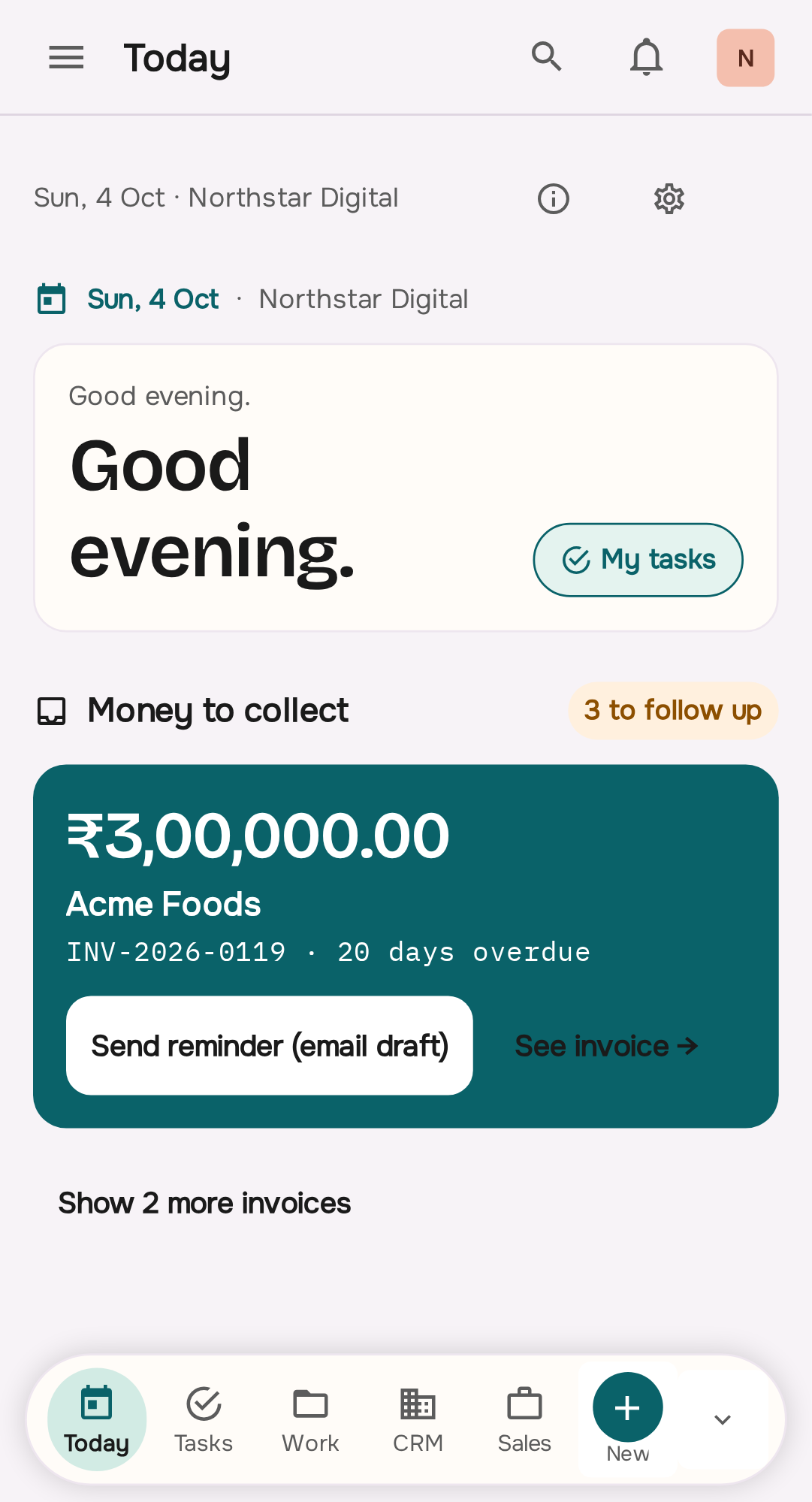

Real captures from the current NoxOrigin application. Not six products — one record moving through the business.
One client. Six systems. No shared truth.
Almost nothing here is broken. Each tool works. The problem is that they each hold a different piece of the same relationship, and the joins between them are made of a person remembering.
- CRMOwns the relationship and forgets the scope.
- SpreadsheetOwns the numbers and nobody trusts the last version.
- ChatOwns the decision and loses it on a new phone.
- Project toolOwns the tasks and never sees the money.
- BillingOwns the invoice and asks you to re-enter the client.
- Email follow-upOwns collection and depends on one person's diligence.
You already know the cost, because you have paid it. What follows is the alternative: add the customer once, and use the same details for the quote, the project, the invoice and the payment.
Customer → Opportunity → Quote → Project → Work → Invoice → Payment.
This is the whole product. Every part of NoxOrigin is a view of these seven records, and the product areas branch from whichever record they actually touch. Select a node to see what it holds and what it produces.
The record
Company, contacts, tags, custom fields, files, and full activity history.
What it produces
The relationship everything else hangs from.
What the product actually looks like.
Captures from the current NoxOrigin app, not mockups. This is the only chapter on the page that shows the interface at length — the rest of the story is told in type, diagrams, and artwork.
Today
One place for what needs attention now — not another dashboard you have to interpret.
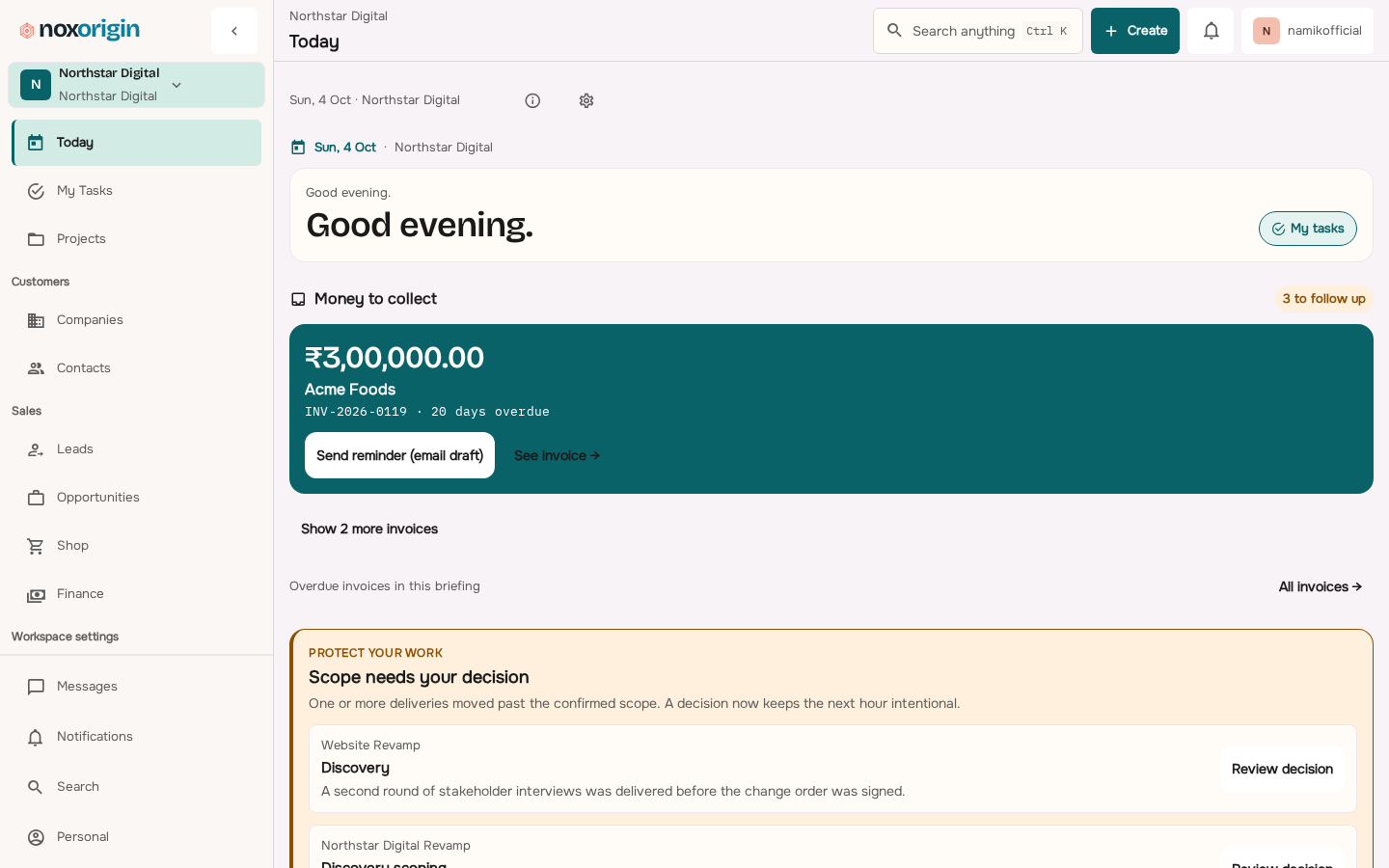
Sell → Deliver → Bill → Collect → Learn.
The chain is only worth having if you can run it. These are the five questions a business asks every day, and where NoxOrigin answers them.
Sell
What is coming in, and who owns it?
A qualified opportunity with a next action and a named owner.
Deliver
Is the promised work actually moving?
Scoped delivery with dated, ownable tasks beside the client record.
Bill
What has been delivered, and what can be invoiced?
A quote and invoice raised against agreed scope, with tax handled correctly.
Collect
What is owed, by whom, and how overdue is it?
Payments recorded against invoices, with outstanding visible by client.
Learn
Which clients, projects, and work actually made money?
Quoted, billed, collected, and outstanding value understood per client and per project.
Eight areas in the product, plus Events as a scoped deployment. None of them is a separate product.
Each area owns a real part of the chain and a set of records. The homepage establishes the model; these are the deep pages where each area is explained properly. Events is the exception: it is a scoped dedicated deployment, not a NoxOrigin plan.
- Task · Follow-up · Notification · Project status · Payment promise
Today
The operating surface for a working day: what is due, what is overdue, what is blocked, and what is waiting on a decision.
- Attention items and assigned work
- Overdue and due-soon visibility
- Notifications and reminders
Roles Owner · Admin · Member
- Company · Contact · Lead · Opportunity · Sales process · Activity
Customers & CRM
Companies, contacts, leads, opportunities, ownership, stages, and next actions — so no relationship depends on someone's memory or inbox.
- Companies, contacts, tags, custom fields, files, and activity
- Lead intake, assignment, duplicate handling, and scoring
- Configurable sales stages, lost reasons, and next actions
Roles Owner · Admin · Sales
- Project · Task · Task list · Assignment · Follow-up
Projects & Work
Projects, tasks, assignments, and recurring follow-ups — delivery work that stays attached to the client and opportunity that caused it.
- Projects with status, dates, and members
- Tasks, task lists, priorities, and board or list layout
- Assignments, due dates, and recurring follow-ups
Roles Owner · Admin · Member
- Quote · Invoice · Payment · Payment promise · Receivable · Tax
Quotes, Billing & Finance
Quotes, GST-compliant invoices, recorded payments, and receivables — the commercial end of the same record that started as a relationship.
- Quotes with line items, tax, terms, and send state
- GST-compliant invoices and tax breakup
- Payment recording and payment promises
Roles Owner · Admin · Finance
- Conversation · Message · Mention · Template · Saved reply
Inbox
Shared customer conversations with the customer record attached, so replies are not lost in a personal mailbox.
- Shared conversations linked to the customer record
- Internal comments and mentions
- Templates and saved replies
Roles Owner · Admin · Member
- Product · Stock · Warehouse · Purchase · POS shift · Promotion · Day-end
Commerce
Catalog, inventory, purchasing, promotions, POS, and day-end — for businesses that sell stock rather than sell hours.
- Catalog, stock, warehouses, and purchasing
- POS billing, receipts, and payment mix
- Promotions and discounts
Roles Owner · Admin · Finance · Counter staff
- Event · Ticket batch · Ticket · Scanner device · Scan log · Gate
Events & Ticketing
Scoped dedicated deployment — not part of any NoxOrigin plan
A scoped, dedicated deployment sold and run separately. Events & Ticketing is not in the current NoxOrigin application and is not part of any NoxOrigin plan.
- Event setup and ticket batch issuance
- Signed QR credentials and offline validation
- Scanner device management and scan logs
Roles Owner · Admin · Finance · Gate staff
- Project economics · Client money · Receivables · Operational report
Reports & Economics
Quoted, billed, collected, and outstanding value by client and project — because revenue alone never told you what made money.
- Client-level billed versus collected value
- Outstanding and ageing views
- Project economics and margin
Roles Owner · Admin · Finance
- Workspace · Branch · Team · Person · Role · Device · Audit entry
Platform & Control
Workspaces, branches, people, roles, permissions, PIN access, approvals, and audit — one system does not mean everyone sees everything.
- Workspaces, branches, stores, and teams
- People, roles, and workspace-scoped permissions
- PIN-based staff access
Roles Owner · Admin · Viewer

One system, different permissions for everyone working in it.
A shared record is only useful if it can be trusted, and trust means access that matches responsibility. NoxOrigin evaluates permissions inside the active workspace, per action — not per screen.
- OwnerHolds the full workspace permission catalog and sees the economics of every client and project.
- AdminRuns the day-to-day operation: records, work, and money, inside the workspace they are given.
- SalesOwns the relationship and the next action, and can see enough delivery and commercial context to close honestly.
- OperationsTurns sold scope into delivered work and keeps the operation moving without chasing people.
- FinanceOwns quotes, invoices, payments, tax, and receivables, with explicit permission gates on money actions.
- MemberDelivery access: read client and project context, create and update tasks, and work the queue.
- ViewerRead-only workspace permissions for review, oversight, and audit.
Illustrative example of how workspace permissions are evaluated. The roles and gates you receive are confirmed during setup rather than assumed from a marketing page.
Industry software, in the language your trade uses.
The homepage sells the operating system. These pages explain how the same records change vocabulary, pressure, and ownership for a particular business. 41 industries are written up in full — here are 7 of the most common.
- Agencies & consultanciesScope, delivery, change, invoice, and collection for people who sell judgement rather than stock.Enquiry → Scope → Engagement → Production → Invoice → Collection → Margin
- Shops & retailCounter billing, stock, GST, and a day-end that reconciles against the drawer.Customer → Purchase order → Stock → Counter sale → Invoice / receipt → Payment → Day-end
- Independent businessesOne operator wearing every hat, held to one honest record rather than four.Enquiry → Agreement → Job → Work → Bill → Collect → Know
- Construction & siteEstimate, variation, site progress, and a bill that follows the work actually done.Enquiry → Estimate → Job site → Work on site → Interim bill → Progress payment → Job costing
- Clinics & practicesPatient, appointment, treatment, and follow-up billing on the same record.Enquiry → Treatment plan → Practice → Chairside work → Patient bill → Settlement → Practice economics
- Auto service centresJob cards, parts, approved variations, and a bill raised from the work rather than from the slip.Booking or walk-in → Job card and estimate → Customer approval → Work and parts consumed → Variation at pickup → Payment and warranty → Workshop economics
- Logistics & courierRate per consignment or lane, the movements that invoice names, and the payout that follows delivery.Shipper or account → Rate for a consignment or a lane → The consignment → Pickup, transit, and delivery attempt → Consignment invoice → Collection on delivery → Carrier economics
Reports: quoted, billed, collected, and outstanding.
Most businesses can tell you their revenue and cannot tell you which client made them money. The four states below are different numbers, and NoxOrigin keeps all four attached to the relationship that caused them.
Quoted
What have we agreed, and with what terms?
Billed
What have we actually raised, with correct tax?
Collected
What has arrived, and against which invoice?
Outstanding
Who owes us, for how long, and since when?
What the record should not decide for you
Connecting the numbers removes the argument about what happened. It does not remove the calls that were always yours: whether to discount, whether to chase, which engagement to stop, and which client to grow.
Open Reports & Economics →Mobile and offline work, away from the desk.
Most of the operational moments that decide an invoice happen nowhere near a desk: on a shop floor, at a gate, in a client’s corridor, or in a vehicle. NoxOrigin is used away from the desk as a working mode, not as a reduced view of one.
- Counter and field staff work from a PIN, without an owner login.
- Validation and billing continue where connectivity is unreliable.
- Everything recorded away from the desk lands in the same record.
This platform did not start as a landing page. It came out of deployments that had to work.
NoxOrigin’s operating model was shaped by dedicated deployments that ran real operations: a CRM for customer work, billing and counter systems for live businesses, and a ticket and gate system for event entry. Those names are still meaningful to people who searched for them — and they are now areas of one product rather than three products you choose between.
We do not publish customer counts, testimonials, or results that a customer has not approved. When genuine deployment material is cleared for publication it appears on the customer stories page, attributed and unchanged.
One product, three plans, the same operating model.
The plans differ in team size, workspaces, and data volume — not in whether the chain is connected. GST is additional where applicable.
Starter
For a small team that wants one shared record instead of three spreadsheets.
- 3 users
- 1 workspace
- 10 active projects
- 1,000 contacts
Growth
For a growing team that needs sales, delivery, and finance in one operating context.
- 10 users
- 1 workspace
- 50 active projects
- 10,000 contacts
Agency
For larger teams running multiple workspaces and a deeper client book.
- 25 users
- 3 workspaces
- 250 active projects
- 50,000 contacts
Custom scope. Integrations, data migration, white-label or customer-branded deployments, and dedicated environments are scoped separately from standard plans. See the custom-scope note →
Resources, documentation, and comparisons.
Run the next client, job, or order through NoxOrigin.
Bring the hand-off that still depends on a spreadsheet. We will map it onto the chain and show you the smallest sensible starting point — not a migration you did not ask for.