CRM Basics for Small Businesses That Still Use WhatsApp and Spreadsheets
Still managing customers through WhatsApp, Excel, or Google Sheets? Learn what a CRM does, when you need one, how to set it up, and how to move without disrupting your business.
You receive a message on WhatsApp.
“Hello. How much do you charge?”
You reply with the price.
The customer asks two more questions.
You answer them.
Then another customer calls.
An employee asks you about an old order.
A supplier sends a payment reminder.
Someone walks into your shop.
By the time you return to WhatsApp, the first customer has disappeared under 37 other chats.
You tell yourself:
“I will follow up in the evening.”
The evening becomes tomorrow.
Tomorrow becomes next week.
The customer buys from someone else.
This does not happen because you are lazy.
It happens because WhatsApp is designed for conversations. It is not designed to run your complete sales process.
A spreadsheet is better for storing names and numbers. But a spreadsheet cannot remind you properly, tell you who should call a customer, show why a deal is stuck, or explain what happened during the last conversation.
This is where a CRM becomes useful.
A CRM is not only for large companies.
It does not need to be expensive.
It does not need to be difficult.
It does not need 200 features.
For a small business, a useful CRM can begin with five simple things:
- Who is the customer?
- What do they want?
- Who is responsible for them?
- What should happen next?
- When should it happen?
That is the foundation of customer relationship management.
This guide explains CRM from the beginning. It is for business owners who currently depend on WhatsApp, phone calls, notebooks, Excel, Google Sheets, or employee memory.
You will learn:
- What a CRM actually does.
- Why WhatsApp and spreadsheets stop working as a business grows.
- How to create a simple sales pipeline.
- What information you should store.
- How employees should use the system.
- How to move your existing customers into a CRM.
- Which automations are genuinely useful.
- How to choose a CRM without wasting money.
- When you do not need a CRM yet.
- How a product such as NoxCRM can fit into this workflow.
You do not need technical knowledge to understand this guide.
Let us start with the simplest question.
What Is a CRM?
CRM means Customer Relationship Management.
The name sounds complicated.
The idea is simple.
A CRM is a shared system where your business keeps customer information and tracks what should happen next.
Think of it as a business notebook that can also:
- Organize customers.
- Assign work to employees.
- Remember old conversations.
- Show the current status of a lead.
- Create follow-up reminders.
- Record calls, meetings, notes, and messages.
- Show which deals were won or lost.
- Help the owner see what the team is doing.
A normal notebook stores information.
A CRM stores information and helps you act on it.
That difference matters.
Suppose a customer named Rakesh asks for an office cleaning quotation.
In a notebook, you may write:
Rakesh — office cleaning — call later.
In a spreadsheet, you may store:
| Name | Phone | Requirement |
|---|---|---|
| Rakesh | 98XXXXXX12 | Office cleaning |
A CRM record can contain:
- Customer: Rakesh Sharma
- Phone number: 98XXXXXX12
- Company: Sharma & Sons
- Requirement: Weekly office cleaning
- Source: Google search
- Assigned employee: Priya
- Current stage: Quotation sent
- Estimated value: ₹18,000 per month
- Last contact: 15 July
- Next action: Call about quotation
- Follow-up date: 18 July at 11:00 AM
- Notes: Wants service to start next month
- Status: Active
The name and phone number are not the most important difference.
The most important fields are:
- Assigned employee
- Current stage
- Next action
- Follow-up date
These four fields turn stored data into work.
Without them, your customer list is only a list.
A CRM Is a Process, Not Just Software
Many businesses buy CRM software and still lose leads.
Why?
Because the software was installed, but the business process did not change.
The team continues to behave like this:
- New leads remain inside WhatsApp.
- Employees keep private notes.
- Follow-ups depend on memory.
- Nobody updates deal stages.
- The owner asks for reports manually.
- Lost deals are never given a reason.
- Customer history stays with one employee.
The business technically has a CRM.
But the CRM is empty or outdated.
That means the business does not really have a CRM process.
A proper CRM process creates simple rules.
For example:
Every serious inquiry must be added to the CRM.
Every active lead must have one owner.
Every open lead must have a next action.
Every next action must have a date.
Every won or lost deal must be closed properly.
Important information must not remain only in personal WhatsApp chats.
These rules are more important than advanced dashboards.
Start with discipline.
Add automation later.
Are WhatsApp and Spreadsheets Bad?
No.
WhatsApp is useful.
Spreadsheets are useful.
The problem is using them for work they were not designed to handle.
WhatsApp is good for communication
WhatsApp works well when you need to:
- Answer questions.
- Send photos.
- Share a location.
- Confirm an appointment.
- Send a quotation.
- Ask for documents.
- Provide an order update.
- Speak in a personal and familiar way.
The WhatsApp Business app also includes business-friendly tools such as labels and product or service catalogs. It can also be used on linked devices. These features can be enough for a very small operation.
But WhatsApp does not automatically answer important management questions.
For example:
- How many new leads came this week?
- Which employee is responsible for each lead?
- Which quotations need follow-up today?
- How many leads have received no reply?
- Why are deals being lost?
- How much possible revenue is in the pipeline?
- Which salesperson is overloaded?
- What did a former employee promise a customer?
- Which leads came from Instagram?
- Which customers should be contacted again?
You can search through chats.
You can add labels.
You can pin important conversations.
But as the number of customers grows, this becomes difficult.
WhatsApp shows messages.
A CRM shows work.
Spreadsheets are good for structured lists
Excel and Google Sheets work well for:
- Customer directories.
- Price lists.
- Simple reports.
- Importing and exporting data.
- Basic calculations.
- Small lists managed by one careful person.
- Temporary tracking during the early stage of a business.
A spreadsheet can be a good first CRM.
That is not a joke.
A clean spreadsheet with clear columns is better than an expensive CRM nobody uses.
But spreadsheets become weak when several people must update them throughout the day.
Common problems include:
- Employees create different copies.
- Required fields are left empty.
- Someone deletes a row.
- Phone numbers are entered in different formats.
- Notes become too long.
- Follow-up dates are missed.
- Employees overwrite each other’s work.
- Nobody knows which information is current.
- Reports require manual cleaning.
- Customer conversations remain outside the sheet.
- The owner cannot see changes clearly.
- Staff can access information they should not see.
A spreadsheet stores rows.
A CRM manages responsibility.
The Real Problem: Your Business Information Is Split
A customer journey may look like this:
- The customer finds your Instagram page.
- They send a WhatsApp message.
- An employee answers from a business phone.
- The employee writes the name in Google Sheets.
- A quotation is created in Word.
- The quotation is sent as a PDF.
- The customer calls another employee.
- A meeting is booked in Google Calendar.
- The customer pays by UPI.
- The final order is recorded in billing software.
- Service problems are discussed through another WhatsApp number.
Every tool may work correctly.
But the complete story is broken into pieces.
This creates questions nobody can answer quickly:
- Did we send the quotation?
- Which version did we send?
- Did the customer accept it?
- Who spoke to them last?
- What was promised?
- Has payment arrived?
- Is another employee already handling this person?
- Should we contact them today?
- Are they a new lead or an existing customer?
- Did they complain previously?
The problem is not that your team lacks information.
The problem is that the information has no single home.
A CRM becomes that home.
It does not always replace every communication tool.
Instead, it connects the important customer facts into one record.
The Difference Between a Contact, Lead, Customer, and Deal
CRM words can be confusing.
Here is a simple explanation.
Contact
A contact is a person whose information you have.
For example:
- A customer.
- A supplier.
- A company employee.
- A decision-maker.
- A person who filled out a form.
- Someone who sent an inquiry.
A contact record usually contains:
- Name.
- Phone number.
- Email.
- Company.
- Address.
- Tags.
- Notes.
Not every contact is trying to buy something.
Lead
A lead is a person or company that may buy from you.
Examples:
- Someone asks for your price.
- Someone fills out a consultation form.
- Someone requests a demo.
- Someone asks whether you deliver to their area.
- Someone calls after seeing an advertisement.
A lead is an opportunity that still needs work.
Customer
A customer has already bought something from you.
A customer can later become a lead again.
For example, a customer who bought website development last year may now ask for digital marketing.
Deal or opportunity
A deal is a possible sale.
One customer can have several deals.
For example, Raj Industries may have:
- One deal for website development.
- One deal for CRM implementation.
- One deal for annual maintenance.
The customer is the same.
The opportunities are different.
This distinction becomes useful when you sell services, subscriptions, projects, property, machinery, insurance, wholesale goods, or other higher-value products.
For a very small business, you may not need all four terms.
You can begin with:
- New inquiry.
- Active lead.
- Customer.
- Closed.
Keep the system understandable.
What Is a Sales Pipeline?
A sales pipeline is a set of steps showing where each lead currently stands.
Imagine pipes carrying water.
A lead enters at one side.
Your process moves the lead forward.
Some leads reach the final stage and become customers.
Some stop.
Some leave.
Some remain stuck.
A pipeline makes this movement visible.
A simple service-business pipeline may be:
- New inquiry
- Contacted
- Requirement understood
- Quotation sent
- Decision pending
- Won
- Lost
Each lead should be placed in one stage.
Example
A pest-control company receives five inquiries.
| Lead | Current stage |
|---|---|
| Rakesh | New inquiry |
| Neha | Contacted |
| City Cafe | Site visit booked |
| Aman Stores | Quotation sent |
| Green Park Society | Won |
The owner can now see what is happening.
Without a pipeline, all five are simply names in a chat list.
With a pipeline, the owner can ask better questions:
- Why has Neha not moved forward?
- Is the City Cafe visit happening today?
- When should Aman Stores receive a follow-up?
- Who is handling the Green Park Society onboarding?
- Are there new inquiries nobody has contacted?
This is the beginning of control.
How Many Pipeline Stages Should You Create?
Start with four to seven stages.
Do not create 20 stages on the first day.
Too many stages confuse employees.
Your stages should represent meaningful changes.
A stage is useful when entering that stage changes what your team should do.
For example:
Stage: New inquiry
Action:
- Check the inquiry.
- Assign an employee.
- Send the first response.
Stage: Requirement understood
Action:
- Prepare the correct offer.
- Collect missing information.
- Estimate price and timeline.
Stage: Quotation sent
Action:
- Record quotation amount.
- Store the quotation.
- Schedule a follow-up.
Stage: Won
Action:
- Confirm payment or order.
- Begin onboarding.
- Hand the customer to delivery or operations.
Do not create separate stages for tiny actions such as:
- Message opened.
- Typing.
- Called once.
- Called twice.
- Customer said maybe.
- Customer sent thumbs-up emoji.
Those details can live in notes or activities.
Pipeline stages should remain clear.
Example Pipelines for Different Small Businesses
There is no single pipeline for every company.
Your pipeline should match the way you sell.
Pipeline for a home-service business
Useful for cleaning, repair, pest control, salon-at-home, appliance service, or maintenance.
- New inquiry
- Service required
- Visit scheduled
- Price confirmed
- Work in progress
- Completed
- Cancelled
Pipeline for an agency
Useful for marketing, web development, design, software, recruitment, or consulting.
- New lead
- Discovery call
- Qualified
- Proposal sent
- Negotiation
- Won
- Lost
Pipeline for a wholesaler
- New buyer inquiry
- Requirement received
- Price shared
- Sample or terms discussed
- Purchase order expected
- Order confirmed
- Lost
Pipeline for a coaching centre
- New inquiry
- Counselling pending
- Counselling completed
- Trial class
- Fee discussion
- Enrolled
- Not enrolled
Pipeline for a property broker
- New inquiry
- Budget confirmed
- Property options shared
- Visit scheduled
- Negotiation
- Booking completed
- Lost
Pipeline for a B2B manufacturer
- Inquiry received
- Technical requirement reviewed
- Estimate in preparation
- Quotation submitted
- Sample or approval pending
- Purchase order received
- Lost
Your CRM should fit your workflow.
You should not damage your workflow to fit a generic CRM template.
The Seven Parts of a Useful Small-Business CRM
You do not need every feature on day one.
You need a strong foundation.
A useful small-business CRM should handle seven basic jobs.
1. A Clear Customer Record
Each customer or lead needs one main record.
That record should answer:
- Who is this?
- How can we contact them?
- What do they want?
- Where did they come from?
- Who is responsible?
- What has already happened?
- What should happen next?
Basic fields may include:
- Full name.
- Phone number.
- Email address.
- Company name.
- City or location.
- Lead source.
- Assigned employee.
- Current stage.
- Product or service required.
- Estimated value.
- Last contact date.
- Next follow-up date.
- Notes.
- Tags.
Do not collect information simply because the CRM allows you to add more fields.
Store information that helps your team make a decision or complete the work.
For example, a local repair business may need:
- Appliance type.
- Brand.
- Model number.
- Address.
- Preferred visit time.
A digital agency may need:
- Company website.
- Monthly marketing budget.
- Required service.
- Decision-maker.
- Target launch date.
A wholesaler may need:
- Product category.
- Required quantity.
- GST details.
- Delivery location.
- Expected order frequency.
Different businesses need different fields.
2. Ownership
Every active lead needs one owner.
The owner is the person responsible for moving that lead forward.
The owner does not need to complete every task personally.
But they are responsible for making sure the lead does not disappear.
Without ownership, employees think:
“Someone else will reply.”
Or:
“I thought Rahul was handling it.”
Or:
“That inquiry came on the main phone. I do not know who took it.”
This is how leads get lost.
A CRM should show ownership clearly.
For example:
| Lead | Owner |
|---|---|
| Rakesh Sharma | Priya |
| City Dental | Rahul |
| BluePeak Gym | Namik |
| Kapoor Events | Unassigned |
The unassigned lead should immediately receive attention.
A simple rule can be:
No new lead should remain unassigned for more than 15 minutes during working hours.
Your exact time may differ.
The important part is having a rule.
3. A Current Stage
Each lead must have a visible status.
A stage answers:
“Where are we with this customer?”
Without stages, all leads look the same.
A customer who just said hello appears beside a customer who is ready to pay.
That makes prioritisation difficult.
The current stage tells employees what kind of action is required.
For example:
- A new inquiry needs a quick response.
- A qualified lead needs an offer.
- A lead with a quotation sent needs follow-up.
- A won deal needs onboarding.
- A lost deal needs a reason.
Stages help the team focus.
4. A Next Action
Every open lead should have a next action.
Examples:
- Call the customer.
- Send a quotation.
- Ask for measurements.
- Confirm the appointment.
- Share product photos.
- Arrange a demo.
- Collect documents.
- Ask the manager to approve a discount.
- Follow up after the customer’s meeting.
- Send a payment reminder.
“Follow up” is often too vague.
A better next action is:
Call Rakesh to confirm whether he approved the ₹18,000 quotation.
That tells the employee exactly what to do.
A lead without a next action is likely to become forgotten.
5. A Follow-Up Date
A next action also needs a date.
“Call later” is not a real plan.
“Call on Monday at 11:00 AM” is a plan.
Suppose a customer says:
“My partner is travelling. Call me after the 20th.”
The employee should not depend on memory.
They should create a task:
- Action: Call about final approval.
- Date: 21 July.
- Time: 11:30 AM.
- Owner: Priya.
On 21 July, the CRM should show that task.
The employee does not need to remember the promise for ten days.
The system remembers it.
That is one of the biggest practical benefits of a CRM.
6. An Activity History
The CRM should show important events in order.
For example:
- 10 July: Lead created from website form.
- 10 July: Assigned to Rahul.
- 10 July: First call completed.
- 11 July: Requirement note added.
- 12 July: Site visit completed.
- 13 July: Quotation for ₹42,000 sent.
- 15 July: Customer asked about payment terms.
- 16 July: Revised quotation sent.
- 18 July: Follow-up due.
This timeline helps anyone understand the customer.
It is especially useful when:
- An employee is absent.
- A lead is transferred.
- A customer calls a different branch.
- An employee leaves the company.
- The owner wants to review a complaint.
- The customer says something different from what was previously agreed.
- The business needs to confirm who changed information.
The timeline does not need to store every “hello” and “thank you.”
Store the events that affect the business relationship.
7. A Reason for Winning or Losing
When a deal ends, record the result.
For won deals, you may record:
- Final value.
- Product or service purchased.
- Expected start date.
- Payment status.
- Handoff owner.
For lost deals, record a simple reason.
Examples:
- Price too high.
- Customer chose a competitor.
- No response.
- Requirement not supported.
- Delivery unavailable.
- Project postponed.
- Budget cancelled.
- Duplicate inquiry.
- Customer was not serious.
- Lead outside service area.
Do not use “lost” as the only explanation.
The reason helps you improve.
Suppose 40% of lost deals say “price too high.”
That does not automatically mean you should reduce prices.
You may need to:
- Explain value better.
- Offer smaller packages.
- qualify budgets earlier.
- Show better proof.
- target a different customer group.
- improve payment terms.
Without lost reasons, you are guessing.
A Complete Example: From WhatsApp Message to Customer
Let us follow one lead from beginning to end.
Imagine you own an interior design business.
Step 1: The inquiry arrives
A customer sends a WhatsApp message:
“Hi. I need interiors for my new 2BHK. What is your price?”
An employee replies.
The message looks promising.
The employee creates a CRM record.
- Name: Aditi Mehra
- Phone: 98XXXXXX74
- Source: Instagram
- Requirement: 2BHK interior design
- Location: Noida
- Owner: Rahul
- Stage: New inquiry
Step 2: The first call happens
Rahul calls Aditi.
He learns:
- Flat possession is expected next month.
- Budget is around ₹8–10 lakh.
- She wants modular kitchen, wardrobes, false ceiling, and lighting.
- Both Aditi and her husband will make the final decision.
Rahul adds these notes.
He moves the lead to:
Requirement understood
He creates the next action:
Schedule a site visit after possession.
Step 3: A reminder is created
Aditi says possession should happen on 5 August.
Rahul creates a task for 6 August:
Call Aditi and confirm possession and site-visit date.
The lead can now remain quiet for three weeks without being forgotten.
Step 4: Site visit
On 6 August, the CRM reminds Rahul.
He calls Aditi.
The visit is booked for 8 August.
The stage changes to:
Site visit scheduled
After the visit, Rahul adds measurements and photos.
Step 5: Proposal
The design team prepares a proposal for ₹9.2 lakh.
The proposal is uploaded or linked in the CRM.
The stage changes to:
Proposal sent
The next action is:
Call Aditi on 12 August to discuss the proposal.
Step 6: Negotiation
Aditi asks whether the price can be reduced.
Rahul records:
Customer wants to remain below ₹8.5 lakh. Will consider removing false ceiling from two rooms.
The team revises the scope.
A new proposal for ₹8.6 lakh is sent.
Step 7: The deal closes
Aditi accepts.
The stage moves to:
Won
The CRM records:
- Final value: ₹8.6 lakh
- Advance required: ₹1.72 lakh
- Expected start: 20 August
- Handoff: Project manager
- Source: Instagram
The business has now learned:
- Instagram generated the customer.
- Rahul managed the lead.
- The final deal took around six weeks.
- The first proposal was reduced.
- The customer bought a ₹8.6 lakh project.
Now imagine 100 leads moving through the same process.
Without a CRM, the owner sees many messages.
With a CRM, the owner sees a business system.
Warning Signs That You Need a CRM
You do not need a CRM only because other companies use one.
You need it when your existing system causes repeated problems.
Here are common warning signs.
You forget follow-ups
This is the clearest sign.
You remember a promising customer three weeks later and think:
“We never called them again.”
A CRM should reduce this problem.
Customers must repeat themselves
A customer explains the same requirement to several employees.
This happens because the earlier conversation is not visible.
Leads belong to employees instead of the business
The complete customer history remains on an employee’s phone.
When the employee is absent or leaves, the relationship disappears.
You do not know what your team is doing
You repeatedly ask:
- Did you call them?
- Did we send the price?
- What happened to that lead?
- Who is handling this customer?
- Why did this deal fail?
A CRM cannot remove the need for management.
But it can make the answers visible.
You have several spreadsheet versions
Files appear with names such as:
- Leads Final.xlsx
- Leads Final 2.xlsx
- Leads Updated.xlsx
- New Leads Latest.xlsx
- Leads Latest Final Correct.xlsx
This is a sign that your process has no reliable system of record.
WhatsApp labels are no longer enough
Labels such as “New Lead,” “Follow Up,” and “Paid” can work at a small scale.
They become weak when you need:
- Multiple employees.
- Detailed tasks.
- Deal values.
- Reports.
- Access control.
- Activity history.
- Branch-level visibility.
- Several products or services.
- Formal handoffs.
You cannot measure lead sources
You spend money on:
- Google Ads.
- Instagram.
- Facebook.
- Justdial.
- IndiaMART.
- Local partnerships.
- Referral programmes.
But you do not know which source creates useful customers.
A CRM can record the source of each lead.
You lose work during employee changes
When someone resigns, customer knowledge should remain with the business.
A CRM provides continuity.
Your spreadsheet requires a spreadsheet expert
Only one person understands the formulas, colours, hidden columns, and naming rules.
That is a business risk.
When You May Not Need a CRM Yet
A CRM is not always necessary.
You may be fine with WhatsApp Business and a clean spreadsheet when:
- You receive only a few inquiries each week.
- One person handles every customer.
- The sales process finishes in one conversation.
- Customers usually buy immediately.
- Repeat follow-up is rare.
- There is no sales team.
- You can review every active customer easily.
- Your current system is accurate and consistent.
For example, a small food stall may not need a sales CRM.
A local shop where customers walk in, pay, and leave may need billing or inventory software more than CRM software.
A freelance designer with four active clients may work well with a task manager and spreadsheet.
Do not buy software to feel professional.
Buy software when it solves a real operational problem.
Start With a Minimum CRM
A common mistake is trying to build the perfect CRM before anyone uses it.
Begin with the smallest useful setup.
Minimum required fields
Use:
- Customer name.
- Phone or email.
- Requirement.
- Source.
- Owner.
- Stage.
- Next action.
- Follow-up date.
That is enough to start.
You can add more fields after the team develops the habit of updating these eight.
Minimum pipeline
Use:
- New
- Contacted
- Offer sent
- Won
- Lost
You can later add qualification, meetings, negotiation, or onboarding.
Minimum daily rule
Use:
Every open lead must have an owner and a next follow-up.
This single rule creates more value than a complicated dashboard.
How to Run the CRM Every Day
A CRM should become part of the working day.
It should not be something employees update once a month before a management meeting.
Here is a simple routine.
Start of the day
Each employee checks:
- Follow-ups due today.
- Overdue tasks.
- New assigned leads.
- Customers waiting for a response.
- Meetings or visits scheduled.
This can take five to ten minutes.
After every important interaction
The employee updates:
- What happened.
- Whether the stage changed.
- What should happen next.
- When the next action should happen.
This should usually take less than one minute.
Before lunch
The employee checks whether any new lead remains unanswered.
End of the day
The employee checks:
- Did I complete today’s follow-ups?
- Did I update the important outcomes?
- Does every active lead have a next action?
- Is anything blocked?
- Does a manager need to approve something?
Owner or manager review
The owner does not need to read every note.
The owner should review exceptions:
- New leads without owners.
- Overdue follow-ups.
- High-value deals with no activity.
- Proposals waiting too long.
- Deals repeatedly moved backward.
- Leads marked lost without a reason.
- Employees with excessive pending work.
The CRM should help the owner notice problems.
It should not create another full-time data-entry job.
A Simple Weekly CRM Meeting
Hold one short review each week.
Do not turn it into a two-hour punishment.
A useful CRM meeting can take 20–30 minutes.
Review:
- New leads received.
- Leads not contacted.
- Important follow-ups due.
- High-value open deals.
- Deals won.
- Deals lost.
- Leads stuck in one stage.
- Team blockers.
- Incorrect or missing data.
- One process improvement for next week.
Avoid reviewing every customer one by one.
Focus on work that needs a decision.
For example:
“These seven quotations have received no follow-up.”
“Three leads have no owner.”
“Most Instagram leads are not qualified.”
“Rahul has 45 active leads while Priya has 12.”
“Customers are waiting too long for estimates.”
These observations can improve the business.
Moving From WhatsApp and Spreadsheets to a CRM
Do not try to move everything in one night.
A controlled migration is safer.
The goal is not to create a perfect database.
The goal is to stop losing active business.
Step 1: Define the Problem
Write one clear reason for adopting the CRM.
Examples:
- We forget follow-ups.
- Leads are not assigned clearly.
- Customer history remains in employee phones.
- We cannot see pending quotations.
- We do not know which lead sources work.
- The owner cannot see sales progress.
- Employees duplicate work.
- We need better handoffs between sales and service.
Do not start with:
“We want AI automation and a 360-degree omnichannel customer experience.”
That sentence does not tell employees what to fix.
Use a real problem.
For example:
“Every active inquiry should have an owner and follow-up date.”
That is clear.
Step 2: Write Down Your Current Process
Choose one normal lead.
Follow what happens from beginning to end.
Ask:
- Where does the inquiry arrive?
- Who sees it first?
- Who replies?
- What information is collected?
- How is the lead assigned?
- When is a quotation prepared?
- Who approves discounts?
- How are reminders created?
- How is payment confirmed?
- When does a lead become a customer?
- What happens after the sale?
- How is a failed deal recorded?
You may discover that your team members follow different processes.
That is useful information.
Do not hide the differences.
Fix them.
Step 3: Create a Simple Pipeline
Use the real steps from your business.
Do not copy a software company’s pipeline without thinking.
Your stages should use words your employees understand.
For example, a local service team may understand:
- New request
- Call pending
- Visit booked
- Price shared
- Customer deciding
- Confirmed
- Cancelled
They may not understand:
- MQL
- SQL
- Opportunity validation
- Commercial alignment
- Procurement review
- Closed-lost nurture
Simple language improves usage.
Step 4: Decide What Data Is Necessary
Create a list of required fields.
Separate fields into three groups.
Required now
Information necessary to manage current work.
Examples:
- Name.
- Phone.
- Requirement.
- Owner.
- Stage.
- Follow-up date.
Useful later
Information that helps but is not necessary on day one.
Examples:
- Company size.
- Secondary phone.
- Customer category.
- Expected order frequency.
- Competitor being considered.
Do not migrate
Information that is:
- Outdated.
- Duplicated.
- Unclear.
- Unrelated.
- Impossible to verify.
- Stored only because “we may need it someday.”
More data does not always mean more value.
Clean data is better than large data.
Step 5: Clean the Spreadsheet
Before importing anything, fix the obvious problems.
Remove duplicates
The same customer may appear as:
- Raj Traders
- Raj traders
- Raj Traders Delhi
- Mr Raj
- Raj 98XXXXXX10
Use phone number or email to identify possible duplicates.
Do not delete records blindly.
Combine useful notes when required.
Standardise phone numbers
Choose one format.
For example:
+91 98XXXXXXXX
Avoid mixing:
- 98XXXXXXXX
- 098XXXXXXXX
- +9198XXXXXXXX
- 91-98XXXXXXXX
Standardise dates
Use one clear format.
For example:
17 July 2026
Or:
2026-07-17
Avoid dates such as 7/8/26 when employees may not know whether it means 7 August or 8 July.
Separate information into columns
Do not store this in one cell:
Raj, Delhi, furniture, call Friday, budget 2 lakh, came from referral.
Use separate fields:
- Name: Raj
- City: Delhi
- Requirement: Furniture
- Next action: Call
- Follow-up: Friday
- Budget: ₹2 lakh
- Source: Referral
Structured data can be filtered and reported.
A paragraph cannot.
Mark active and inactive records
Separate:
- Active leads.
- Existing customers.
- Old lost leads.
- Invalid records.
- Duplicates.
Move active work first.
Step 6: Import Only Active Leads First
Do not begin by importing every contact collected over ten years.
Start with:
- New leads.
- Active conversations.
- Open quotations.
- Scheduled visits.
- Pending decisions.
- Customers needing follow-up.
- Recent important customers.
These records affect today’s work.
Historical data can be added later when it has a clear use.
A CRM with 300 accurate active records is more useful than a CRM with 40,000 dirty contacts.
Step 7: Assign Every Active Lead
After import, make sure every active lead has an owner.
Do not leave everything assigned to the owner of the business.
Distribute responsibility based on:
- Territory.
- Product.
- Service.
- Branch.
- Lead source.
- Employee workload.
- Customer language.
- Existing relationship.
Make the rules clear.
For example:
- Delhi leads go to Priya.
- Gurgaon leads go to Rahul.
- Website projects go to Namik.
- Existing customers return to their previous owner.
- Leads above ₹5 lakh require manager review.
The CRM can automate these rules later.
First confirm that the rules make sense manually.
Step 8: Train the Team on Five Actions
Do not give employees a four-hour tour of every menu.
Teach them five actions:
- Create a lead.
- Find a lead.
- Update the stage.
- Add a note.
- Create the next follow-up.
Let them practise with real examples.
After they understand the basics, teach:
- Filters.
- Reports.
- Templates.
- Automations.
- Imports.
- Advanced permissions.
Training should follow actual work.
Step 9: Run the Old and New Systems Together Briefly
For a few days, the team may still use WhatsApp and the CRM together.
That is normal.
Set one important rule:
WhatsApp can remain the communication channel, but the CRM becomes the record of responsibility and next action.
An employee can still talk to the customer on WhatsApp.
After the conversation, they update the CRM with the useful outcome.
Do not run two complete databases for months.
The temporary overlap should help you catch problems.
It should not become permanent duplication.
Step 10: Review the Migration
After one week, check:
- Are active leads present?
- Are owners correct?
- Are follow-up dates visible?
- Are employees updating stages?
- Are duplicates appearing?
- Are any fields confusing?
- Is data entry taking too long?
- Are permissions correct?
- Are reports trustworthy?
- Are WhatsApp conversations still hiding important information?
Fix the process before adding more features.
A Practical Seven-Day Migration Plan
Day 1: Understand the workflow
- Write down how an inquiry becomes a customer.
- Identify where leads are lost.
- Choose the main migration goal.
Day 2: Build the pipeline
- Create four to seven stages.
- Define what each stage means.
- Decide when a lead moves forward.
Day 3: Clean active data
- Remove obvious duplicates.
- Fix phone numbers.
- Separate active and old leads.
- Identify missing owners.
Day 4: Configure the CRM
- Add users.
- Create fields.
- Create the pipeline.
- Configure basic permissions.
- Test five sample leads.
Day 5: Import active leads
- Import open inquiries.
- Assign owners.
- Add next actions.
- Check data accuracy.
Day 6: Train the team
- Use real business examples.
- Practise creating and updating leads.
- Explain daily rules.
- Answer process questions.
Day 7: Start the daily routine
- Review new leads.
- Complete follow-ups.
- Record important outcomes.
- Identify errors.
- Adjust confusing stages or fields.
You do not need to complete every advanced integration during this week.
The first goal is visibility.
WhatsApp Business App vs WhatsApp Connected to a CRM
These are different levels of operation.
Level 1: Normal WhatsApp
This is mainly for personal messaging.
It may work for a solo operator.
But it lacks several business organisation features.
Level 2: WhatsApp Business app
The WhatsApp Business app can provide features such as:
- Business profile.
- Labels.
- Catalog.
- Business messaging tools.
- Linked-device access.
This may be enough when:
- One person handles most chats.
- The volume is manageable.
- Sales are simple.
- Formal reporting is not required.
- You do not need complex assignments.
- You do not need deep automation.
Official WhatsApp documentation describes labels as a way to organise and find chats, while catalogs allow businesses to present products or services.
Level 3: CRM beside WhatsApp
At this level, WhatsApp remains a communication tool.
The CRM stores:
- Customer details.
- Lead owner.
- Deal stage.
- Tasks.
- Follow-up dates.
- Notes.
- Sales value.
- Reports.
The employee may manually record important outcomes in the CRM.
This is a practical starting point for many businesses.
Level 4: WhatsApp Business Platform connected to a CRM
This can support more structured business messaging and software integrations.
It is usually considered when the business needs:
- A shared team inbox.
- Multiple agents.
- Automated routing.
- Approved message templates.
- Conversation logging.
- Workflow triggers.
- Central reporting.
- Integration with forms, websites, or internal systems.
Meta identifies its Cloud API as the preferred direction for the WhatsApp Business Platform, and its older on-premises API has been sunset.
Do not begin with a complex WhatsApp integration merely because it sounds modern.
First solve:
- Ownership.
- Follow-up.
- Stage tracking.
- Customer records.
- Team discipline.
An integration will automate your process.
It will not repair a process that nobody understands.
Should a CRM Replace WhatsApp?
Usually, no.
Customers may prefer WhatsApp.
Your employees may already know how to use it.
The goal is not necessarily to force every conversation into a new app.
The goal is to stop important business information from existing only inside chat threads.
A practical division is:
Use WhatsApp for:
- Conversations.
- Photos.
- Quick questions.
- Appointment confirmations.
- Location sharing.
- Status updates.
- Personal communication.
Use the CRM for:
- Customer records.
- Lead ownership.
- Pipeline stages.
- Follow-up dates.
- Tasks.
- Important notes.
- Deal value.
- Reports.
- Handoffs.
- Management visibility.
This approach is easier for teams to adopt.
CRM Automation Explained Simply
Automation means:
When something happens, the system performs another action automatically.
For example:
When a new website form is submitted, create a lead and assign it to Priya.
The trigger is:
Form submitted.
The automatic actions are:
- Create lead.
- Assign Priya.
- Create follow-up task.
- Notify Priya.
Automation can save time.
It can also create a mess when the rules are wrong.
Start with simple, low-risk automations.
Useful First Automations
New-lead assignment
When a new lead enters:
- Assign an employee.
- Set the stage to “New.”
- Create a first-contact task.
Follow-up reminder
When a follow-up date arrives:
- Notify the owner.
- Show the task as due.
Overdue warning
When a task becomes overdue:
- Notify the employee.
- Show it in the manager’s exception list.
Stale-lead reminder
When an active lead has no activity for several days:
- Ask the owner to review it.
Stage-based task
When a deal moves to “Quotation sent”:
- Create a follow-up task for two days later.
Won-deal handoff
When a deal is won:
- Notify operations.
- Create onboarding work.
- Record the final value.
Lost-reason requirement
When an employee marks a lead as lost:
- Require a lost reason.
These automations support good habits.
Automations You Should Delay
Avoid complex automation at the beginning.
Examples:
- AI sending messages without review.
- Large broadcast campaigns.
- Automatic discounts.
- Deleting old customers automatically.
- Moving deals based only on message keywords.
- Reassigning important customers without warning.
- Sending repeated reminders every few hours.
- Creating dozens of tasks from one event.
- Automatic “lost” status without employee review.
Every automation should have:
- A clear trigger.
- A clear action.
- An owner.
- A way to stop it.
- A way to review errors.
Automate stable processes.
Do not automate confusion.
How to Choose a CRM for Your Small Business
Do not choose a CRM only by counting features.
A product with 500 features may be worse for your business than a focused product with 20 useful features.
Ask practical questions.
1. Does It Match Your Workflow?
Can you create stages that reflect your business?
Can you change fields?
Can you represent:
- Your products.
- Your services.
- Your branch structure.
- Your lead sources.
- Your employee roles.
- Your approval process.
The CRM should not force every business into the same structure.
2. Is It Easy Enough for Employees?
The owner may enjoy dashboards and advanced settings.
The employee needs to:
- Find the customer.
- Understand the current status.
- Add a note.
- Complete a task.
- Create the next follow-up.
Test these basic actions.
If common actions require ten clicks, usage will fall.
3. Does It Work Well on Mobile?
Many small-business employees work away from a desk.
Examples:
- Field salespeople.
- Technicians.
- Property agents.
- Service staff.
- Event teams.
- Delivery coordinators.
- Business owners.
A mobile CRM should make common work easy.
Do not assume that a smaller version of the desktop screen creates a good mobile experience.
Check:
- Task list.
- Lead search.
- Click-to-call.
- Notes.
- Stage updates.
- Follow-up creation.
- Address access.
- Performance on normal phones.
- Poor-network behaviour.
4. Can You Import and Export Data?
You should be able to bring existing data into the system.
You should also be able to take your data out.
Ask:
- Can contacts be imported from CSV?
- Can deals and notes be imported?
- Can data be exported?
- What happens when the subscription ends?
- Can attachments be downloaded?
- Is there an API?
- Is backup available?
Your customer information should not feel trapped.
5. Does It Support Roles and Permissions?
Not every employee should see or change everything.
A CRM may need roles such as:
Owner
- Full workspace access.
- User management.
- Reports.
- Settings.
- Approvals.
Manager
- Team leads.
- Assignment.
- Pipeline review.
- Selected reports.
- Approval actions.
Sales employee
- Assigned leads.
- Tasks.
- Notes.
- Stage updates.
Restricted employee
- Only specific fields or records.
- No exports.
- No deletion.
- No sensitive financial data.
Permissions matter when the team grows.
They also reduce accidental damage.
6. Does It Keep an Activity or Audit History?
You may need to know:
- Who changed the owner?
- Who marked the deal as lost?
- Who edited the phone number?
- Who deleted a note?
- When did the stage change?
- Who exported customer data?
- Who approved a discount?
Not every small business needs a highly advanced audit system.
But important changes should not be invisible.
7. Are Reports Based on Useful Questions?
A beautiful graph is not automatically useful.
Good reports answer business questions.
Examples:
- How many leads arrived?
- How many were contacted?
- How many became customers?
- Which source produced them?
- How long did response take?
- Which stage contains the most stuck leads?
- What value is currently open?
- Why are deals being lost?
- Which follow-ups are overdue?
- How much business did each branch close?
Ask what decision each report helps you make.
8. Can It Grow Without Becoming Too Complicated?
You may begin with:
- Contacts.
- Leads.
- Follow-ups.
Later you may need:
- Forms.
- Shared inbox.
- Multiple pipelines.
- Automations.
- Custom fields.
- Reports.
- Branches.
- APIs.
- Billing handoff.
- Customer support.
- Marketing communication.
Choose a system that supports your likely next step.
Do not pay today for every possible future feature.
9. Is Pricing Clear?
Check the complete cost.
Ask about:
- Price per user.
- Minimum number of users.
- Setup fees.
- WhatsApp charges.
- Automation limits.
- Contact limits.
- Storage.
- Email limits.
- Support.
- API access.
- Reporting.
- Mobile access.
- Data migration.
- Taxes.
- Annual payment conditions.
A low starting price may become expensive after necessary features are added.
Calculate the cost for your real team.
10. Is the Vendor Honest About Product Maturity?
Ask:
- Which features work now?
- Which features are planned?
- Which integrations are proven?
- What support is available?
- Is the mobile app complete?
- Are reports live or mocked?
- Can the vendor demonstrate your exact workflow?
- What happens when something fails?
Clear limitations are better than exaggerated claims.
Data Privacy and Customer Trust
A CRM may contain:
- Names.
- Phone numbers.
- Email addresses.
- Addresses.
- Purchase history.
- Business requirements.
- Conversation notes.
- Payment information.
- Identity documents.
- Employee observations.
This information should be handled carefully.
India’s Digital Personal Data Protection framework governs the processing of digital personal data and recognises both individual privacy rights and lawful business use. Businesses should understand the rules applicable to their specific processing rather than treating customer data as an unrestricted contact list.
This guide is not legal advice, but basic operational practices include:
- Collect only information you genuinely need.
- Explain why information is being collected when required.
- Do not use customer data for unrelated purposes.
- Restrict employee access.
- Remove access when an employee leaves.
- Protect administrator accounts.
- Use strong passwords and multi-factor authentication.
- Avoid sharing exported customer files casually.
- Review third-party integrations.
- Keep backups.
- Define how deletion and correction requests are handled.
- Avoid placing sensitive personal details in unnecessary notes.
A CRM should improve control over customer data.
It should not become a larger uncontrolled spreadsheet.
Avoid Dangerous CRM Notes
Employees should write useful, professional notes.
Good note:
Customer needs a 10-seat plan. Final approval will come from the finance manager after 24 July.
Bad note:
Customer is annoying and probably has no money.
Good note:
Customer requested contact only after 4:00 PM.
Bad note:
Wife controls everything. Call when she is not there.
CRM notes may remain for years.
They may be seen by managers, other employees, support teams, auditors, or the customer under applicable processes.
Write facts.
Avoid insults, guesses, gossip, and unnecessary personal information.
Common CRM Mistakes
Buying a CRM is easy.
Using it properly is harder.
Avoid these mistakes.
Mistake 1: Adding Too Many Fields
A form with 45 required fields slows employees down.
They may:
- Enter fake values.
- Copy the same note everywhere.
- Avoid creating records.
- Keep leads outside the CRM.
Begin with minimum information.
Make a field required only when the business cannot continue without it.
Mistake 2: Creating Too Many Pipeline Stages
Employees cannot remember the difference between 18 similar stages.
Use stages that represent meaningful progress.
Combine tiny actions into notes and tasks.
Mistake 3: Treating Data Entry as the Goal
The goal is not to fill every box.
The goal is to move customers through a controlled process.
Data should help employees act.
Mistake 4: Asking Employees to Update Everything at the End of the Week
By Friday, details are forgotten.
Updates should happen shortly after important interactions.
Keep the update process quick.
Mistake 5: Punishing Employees Using Incomplete Data
Suppose a report shows that Priya has fewer calls than Rahul.
That does not automatically mean Priya is performing poorly.
Priya may handle:
- Larger accounts.
- Longer meetings.
- Existing customers.
- Complex quotations.
Use CRM data as evidence.
Do not treat one number as the complete truth.
Mistake 6: Tracking Employees More Than Customers
A CRM should improve customer work.
It should not feel like surveillance software.
Employees will resist a system designed only to watch them.
Show how it helps them:
- Remember follow-ups.
- Find customer history.
- Reduce repeated reporting.
- Avoid duplicate work.
- Receive clear assignments.
- Prove completed work.
- Handle handoffs.
The system should benefit both management and staff.
Mistake 7: Importing Dirty Data
Bad spreadsheet data does not become good because it enters a CRM.
Clean active records first.
Mistake 8: Automating Too Early
A broken manual process becomes a faster broken process after automation.
Run the workflow manually.
Observe problems.
Then automate stable steps.
Mistake 9: Keeping Important Leads Outside the CRM
Employees may say:
“I will add it after the customer confirms.”
That defeats the purpose.
The CRM should track uncertainty.
A lead does not need to be confirmed before it is recorded.
Mistake 10: Having No Owner for CRM Quality
Someone should maintain:
- Fields.
- Stages.
- Duplicate rules.
- User access.
- Reports.
- Training.
- Automation.
- Data cleanup.
This may be the owner, sales manager, operations manager, or administrator.
Without ownership, the CRM slowly becomes unreliable.
Mistake 11: Buying Based on a Demo Dashboard
Demo accounts contain perfect data.
Real accounts contain:
- Missing phone numbers.
- Duplicate customers.
- Strange requests.
- Cancelled meetings.
- Employees who forget updates.
- Customers with several requirements.
- Leads moving backward.
- Incorrect imports.
Test the normal messy workflow.
Do not only look at the dashboard.
How to Know Whether Your CRM Is Working
Do not measure success by the number of contacts stored.
Measure whether the process improves.
Useful signs include:
Fewer forgotten follow-ups
Check how many follow-ups become overdue.
The number should reduce over time.
Faster first response
Measure the time between inquiry and first response.
You may not need second-by-second tracking.
Even broad categories can help:
- Under 15 minutes.
- Under one hour.
- Same day.
- More than one day.
More leads with clear ownership
New inquiries should be assigned quickly.
Better pipeline visibility
The owner should be able to see active opportunities without asking every employee.
Fewer duplicate calls
Employees should know when another person is already handling the customer.
Better handoffs
When responsibility changes, the next employee should understand the customer without asking them to repeat everything.
More accurate lost reasons
The business should learn why sales fail.
Less manual reporting
Managers should spend less time combining spreadsheets.
Better customer continuity
Customer history should remain available when an employee is absent or leaves.
These are practical outcomes.
Important CRM Numbers for Beginners
You do not need 50 metrics.
Start with a few.
New leads
How many new inquiries entered during the period?
Contacted leads
How many received a real response?
An automated acknowledgement may not count as meaningful contact.
Qualified leads
How many actually fit your business?
Proposals or quotations sent
How many reached the offer stage?
Won deals
How many became customers?
Lost deals
How many ended without a sale?
Conversion rate
A simple version is:
Won deals ÷ total relevant leads × 100
For example:
- 100 qualified leads.
- 20 won deals.
Conversion rate:
20 ÷ 100 × 100 = 20%
Use the same definition each month.
Average deal value
Total value of won deals ÷ number of won deals
Overdue follow-ups
How many actions were not completed by the promised date?
Lead source
Where did customers come from?
Examples:
- WhatsApp.
- Website.
- Instagram.
- Google Ads.
- Referral.
- Walk-in.
- Justdial.
- IndiaMART.
- Existing customer.
- Employee network.
Do not create reports you will never use.
CRM Examples for Different Businesses
The same CRM idea looks different in each business.
Example: Local Repair Company
A refrigerator repair company may store:
- Customer.
- Phone.
- Address.
- Appliance.
- Brand.
- Problem.
- Assigned technician.
- Visit date.
- Estimate.
- Repair status.
- Payment status.
- Warranty follow-up.
The pipeline may be:
- Request received
- Technician assigned
- Visit scheduled
- Estimate shared
- Repair approved
- Completed
- Cancelled
The CRM helps prevent service requests from disappearing in WhatsApp.
Example: Digital Marketing Agency
An agency may store:
- Company.
- Contact person.
- Website.
- Required service.
- Monthly budget.
- Current marketing activity.
- Decision-maker.
- Proposal value.
- Expected start date.
- Next meeting.
- Lost reason.
The pipeline may be:
- New lead
- Discovery
- Qualified
- Strategy or proposal
- Negotiation
- Won
- Lost
The CRM helps the agency manage longer sales cycles.
Example: Coaching Centre
A coaching centre may store:
- Student name.
- Parent name.
- Phone.
- Course.
- Class level.
- Preferred schedule.
- Counsellor.
- Trial status.
- Fee offered.
- Follow-up date.
- Enrolment status.
The pipeline may be:
- Inquiry
- Counselling booked
- Counselling completed
- Trial class
- Fee follow-up
- Enrolled
- Not enrolled
The CRM helps prevent interested students from being forgotten after the first call.
Example: Wholesaler
A wholesaler may store:
- Business name.
- Buyer.
- GST information.
- Product requirement.
- Quantity.
- Location.
- Price shared.
- Credit terms.
- Expected order date.
- Salesperson.
- Order frequency.
The pipeline may be:
- Buyer inquiry
- Requirement received
- Price sent
- Terms discussed
- Order expected
- Confirmed
- Lost
The CRM helps distinguish a casual price request from a serious repeat buyer.
Example: Property Broker
A broker may store:
- Buyer name.
- Phone.
- Budget.
- Preferred location.
- Property type.
- Move-in date.
- Loan status.
- Properties shared.
- Visit date.
- Feedback.
- Next action.
The pipeline may be:
- New inquiry
- Requirement confirmed
- Options shared
- Visit booked
- Interested
- Negotiation
- Booked
- Lost
The CRM helps the broker remember preferences and avoid sending the same unsuitable property repeatedly.
Example: Small Manufacturer
A manufacturer may store:
- Company.
- Contact person.
- Drawing or specification.
- Quantity.
- Material.
- Target price.
- Delivery requirement.
- Sample status.
- Quotation version.
- Purchase-order status.
- Assigned sales engineer.
The pipeline may be:
- Inquiry
- Technical review
- Costing
- Quotation
- Sample approval
- Purchase order
- Lost
The CRM helps connect technical, commercial, and follow-up work.
How to Get Employees to Use the CRM
Employee adoption is often the hardest part.
Do not begin by blaming the team.
Ask why the system is not being used.
Common reasons include:
- It is too slow.
- Mobile experience is poor.
- Too many fields are required.
- Employees must enter the same information twice.
- Nobody explained the benefit.
- Managers do not use the data.
- The pipeline does not match real work.
- Internet access is unreliable.
- Permissions block required actions.
- Employees fear surveillance.
- The CRM creates work but removes nothing.
Fix these problems.
Make the CRM the easiest path
For example:
- New leads should enter automatically where possible.
- Phone numbers should be clickable.
- Follow-up creation should be quick.
- Templates should reduce repetitive writing.
- Customer history should be easy to find.
- Managers should stop asking for separate manual reports.
Do not ask employees to maintain a CRM and then also send the same update in:
- WhatsApp group.
- Excel.
- Email.
- Daily form.
- Printed register.
Remove duplicate reporting.
Use the CRM during meetings
When a salesperson discusses a lead, open the CRM record.
Do not accept:
“It is somewhere in my WhatsApp.”
This teaches the team that the CRM is the shared source of customer work.
Keep rules small
A useful first rule is:
Update the outcome and next action after every important customer interaction.
That is easier to remember than a 20-page CRM policy.
What a CRM Cannot Fix
A CRM is a tool.
It cannot fix every business problem.
It cannot automatically repair:
- A weak product.
- Bad customer service.
- Uncompetitive pricing.
- Poor sales skills.
- Slow quotation preparation.
- Unclear employee roles.
- Dishonest reporting.
- No demand.
- Bad lead sources.
- Constant management changes.
- Promises the business cannot deliver.
A CRM may make these problems more visible.
That is useful.
But software is not a replacement for business decisions.
CRM vs Spreadsheet: A Simple Comparison
| Area | Spreadsheet | CRM |
|---|---|---|
| Store customer names | Good | Good |
| Simple calculations | Very good | Usually basic |
| Quick manual setup | Very good | Requires configuration |
| Lead assignment | Manual | Structured |
| Follow-up reminders | Limited | Core feature |
| Pipeline view | Possible but manual | Built for it |
| Activity history | Difficult | Usually available |
| Multiple employee roles | Limited | Better control |
| Reporting | Manual or formula-based | More automated |
| Conversation context | Weak | Better when integrated or recorded |
| Audit history | Limited | Often available |
| Automation | Limited | Usually stronger |
| Data cleanliness | Depends heavily on users | Can enforce structure |
| Suitable for very small teams | Yes | Sometimes unnecessary |
| Suitable for growing sales teams | Becomes difficult | Better fit |
A spreadsheet is not always the enemy.
It is often the first stage.
The question is whether it still gives you enough control.
CRM Buying Checklist
Before choosing a CRM, answer these questions.
Workflow
- What exact problem are we solving?
- What are our real pipeline stages?
- Where do leads arrive?
- Who handles them?
- What creates a handoff?
- What approvals exist?
Users
- How many people need access?
- Which employees use mobile?
- Who should see all customers?
- Who should export data?
- Who can delete or merge records?
Data
- How many active leads do we have?
- Where is customer information stored?
- How many duplicates exist?
- Which fields are genuinely required?
- What should not be migrated?
Features
- Do we need tasks?
- Do we need multiple pipelines?
- Do we need forms?
- Do we need WhatsApp integration?
- Do we need email?
- Do we need automation?
- Do we need an API?
- Do we need branch-level separation?
Cost
- What is the full monthly cost?
- Are there setup fees?
- Are important features on a higher plan?
- Are messaging costs separate?
- Is support included?
- Can we export data?
Adoption
- Can employees learn the basics quickly?
- Is the mobile experience usable?
- Can common actions be completed quickly?
- Which old reports will be removed?
- Who will maintain the CRM?
Choose after answering these questions.
Where NoxCRM Fits
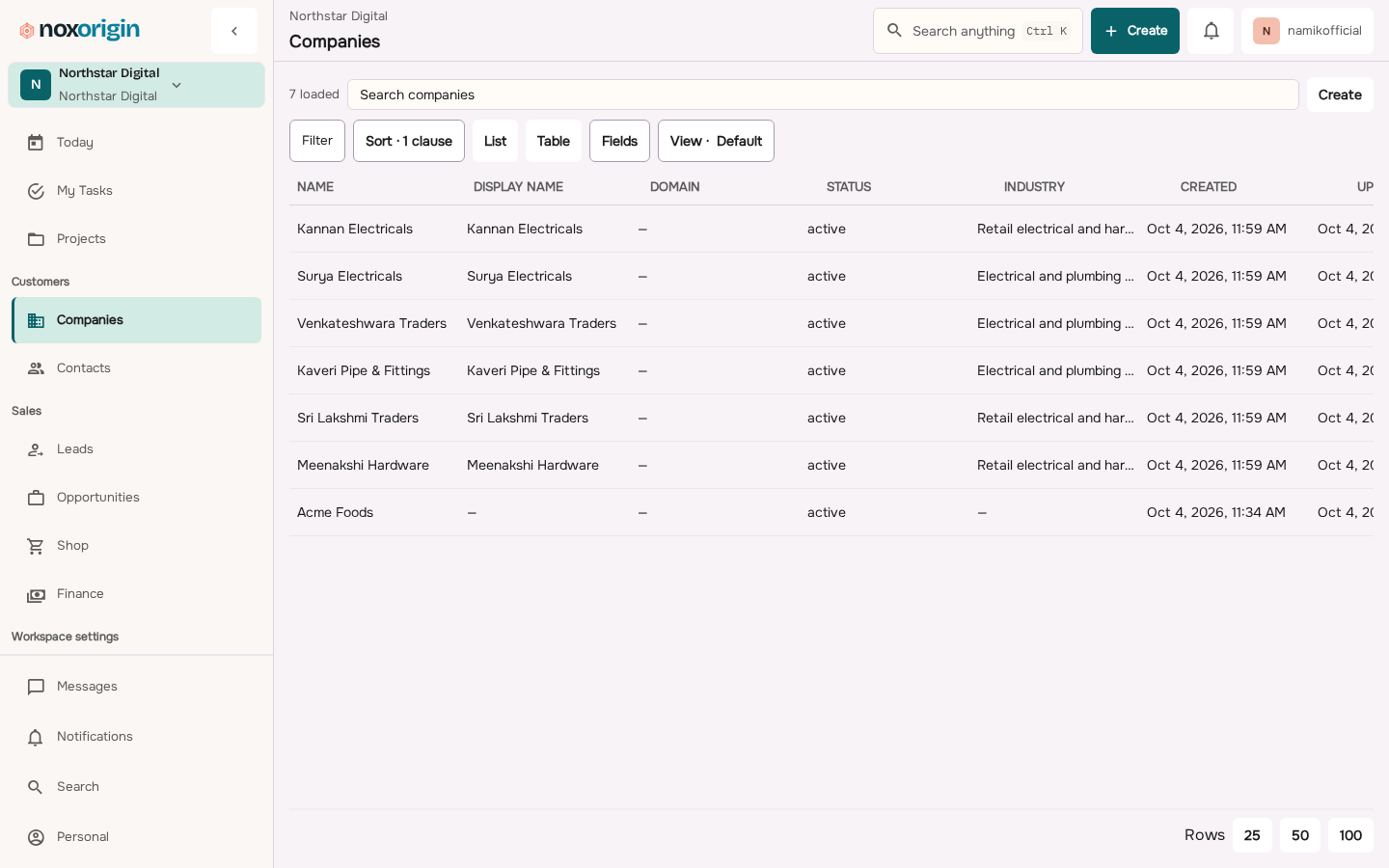
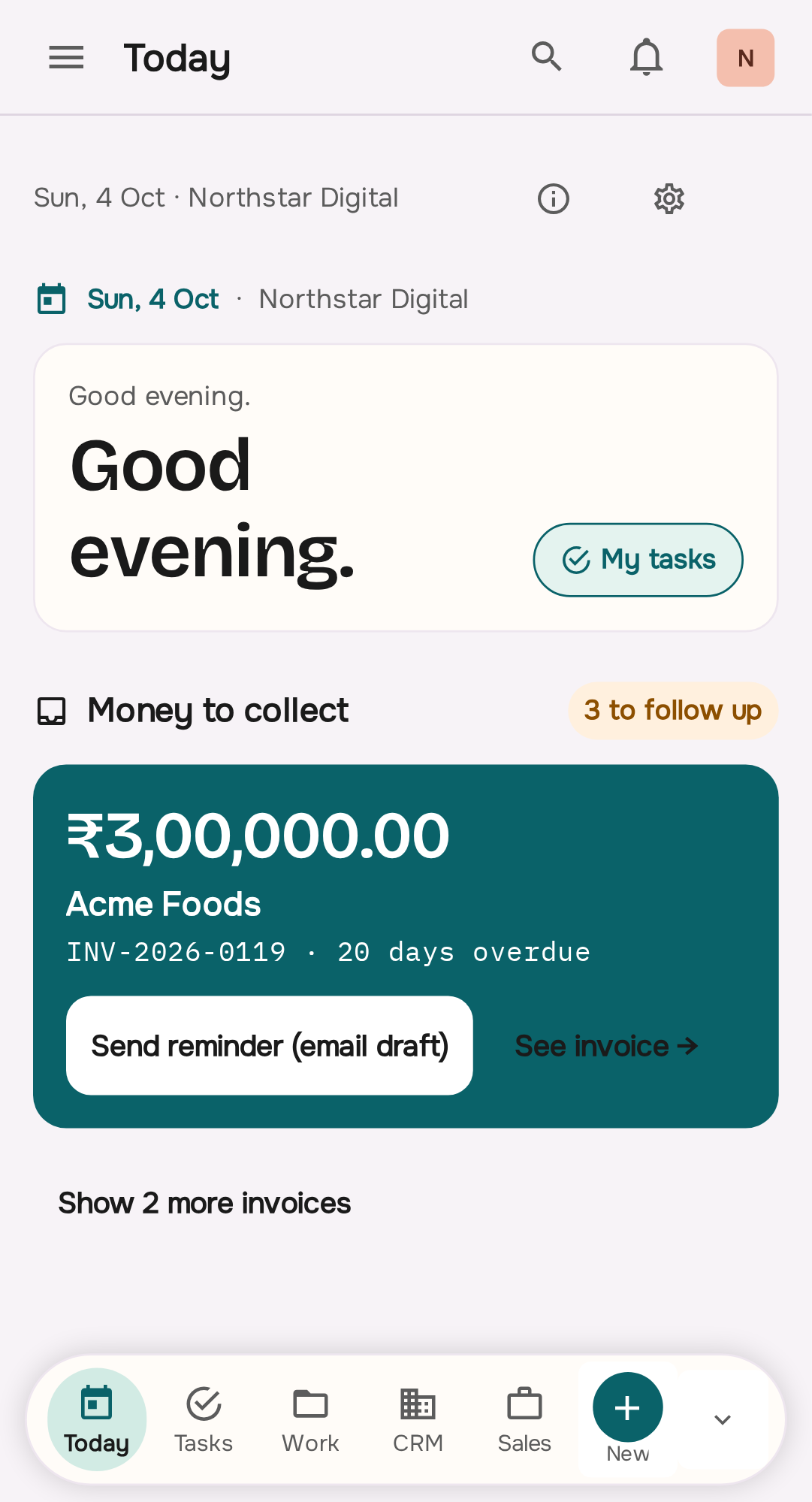
NoxCRM was the former name for the customer part of NoxOrigin. It is not a separate product that is still being built, and there is nothing else to sign up for — what used to be called NoxCRM is the CRM area of NoxOrigin, on the same plans as the rest of it.
That part of NoxOrigin covers:
- Customer and contact records.
- Lead sources.
- Lead submissions.
- Deal pipelines and stages.
- Follow-up work.
- Tasks.
- Forms.
- Inbox foundations.
- Activity history.
- Custom fields.
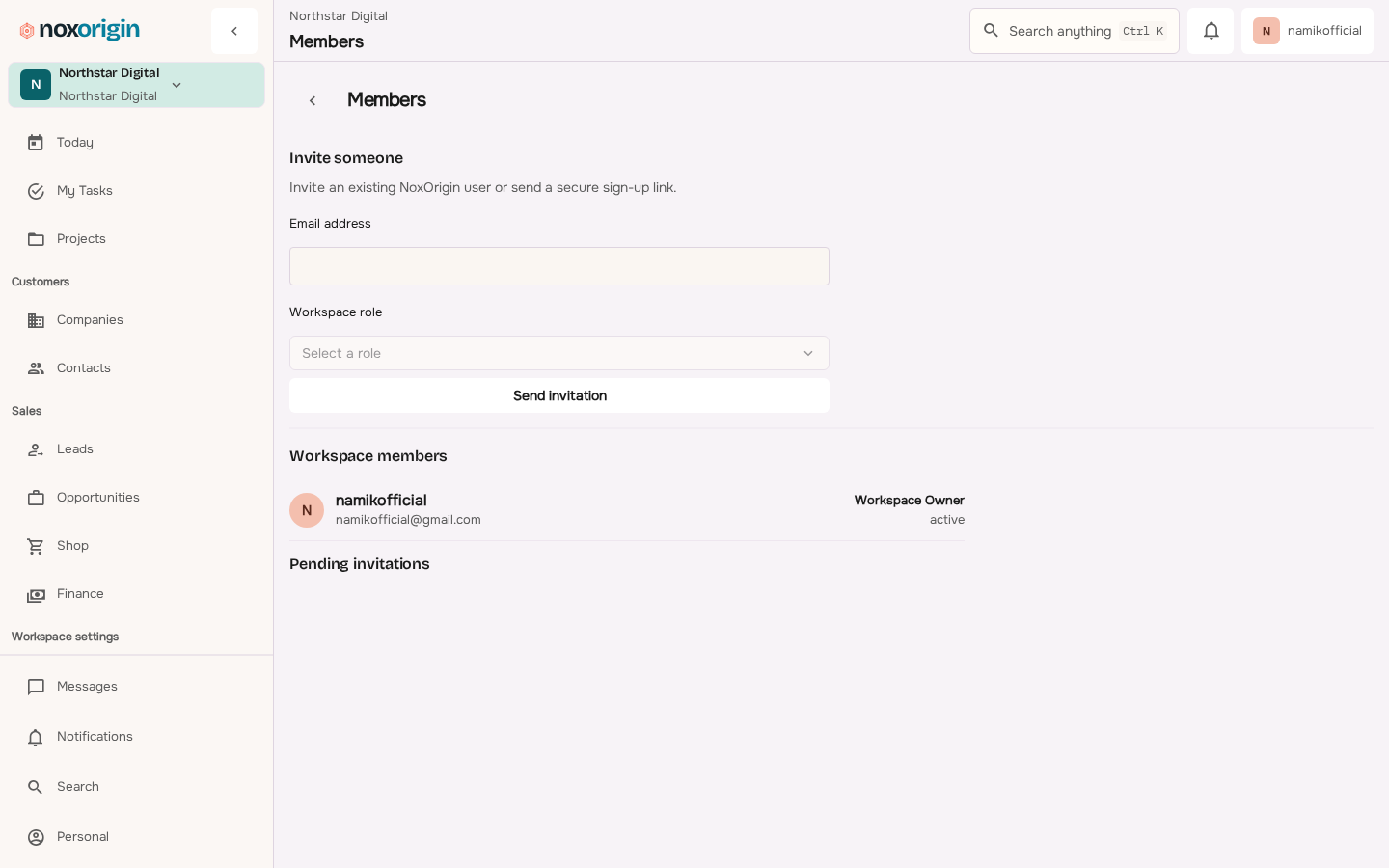
- Roles and controlled access.
- Webhooks and integration foundations.
It is aimed at agencies, service teams, sales teams, and owner-led businesses that need a clearer system for customer work.
One thing that list used to include, and no longer does, is workflow automation. NoxOrigin has no rule engine and no run history today, so nothing is triggered, conditioned, or fired on a schedule. Follow-up is a dated task, a status you change, a permission, and a person. If rules that fire on their own are what you are buying, that is worth knowing before you start, not after.
NoxCRM may be relevant when your business:
Give every important customer a reliable record, an owner, a visible stage, and a next action.
NoxCRM may be relevant when your business:
- Receives regular inquiries.
- Depends on follow-ups.
- Has multiple employees.
- Uses WhatsApp heavily.
- Has outgrown spreadsheets.
- Needs lead ownership.
- Needs a visible sales or service pipeline.
- Wants more controlled customer history.
- Wants follow-up to happen on a schedule without anyone chasing it. (There is no rule engine in NoxOrigin today, so this is done with a dated task and a person.)
- Needs forms and lead-capture foundations.
- Needs roles and audit-aware operations.
It may not be the right starting point when:
- You process simple walk-in transactions.
- You need billing more than lead management.
- You receive very few inquiries.
- You need a fully mature enterprise suite immediately.
- Your process has not been defined.
- Your team is not ready to maintain customer records.
NoxOrigin separates CRM, billing, and ticket operations because these are different workflows.
A CRM should manage customer relationships and follow-ups.
Billing software should manage invoices, payments, receipts, and related counter operations.
Ticketing software should manage ticket creation, scanning, devices, and entry activity.
They may connect over time, but they should not be confused.
Final CRM Checklist
Your first CRM setup is ready when:
- Every active lead has one record.
- Every active lead has an owner.
- Every active lead has a stage.
- Every active lead has a next action.
- Every next action has a date.
- Employees know how to update records.
- The owner can see overdue work.
- Won and lost deals are closed correctly.
- Lost deals contain reasons.
- Old spreadsheet copies are no longer treated as current.
- Important customer information does not remain only in personal chats.
- User access is removed when employees leave.
- The team reviews the system every week.
- Automations are added only after the manual process works.
You do not need perfection.
You need a system the team can trust.
Conclusion
WhatsApp helps you speak with customers.
Spreadsheets help you store information.
A CRM helps you run the process between the first inquiry and the final result.
The change does not need to be dramatic.
Start with one simple goal:
No serious customer inquiry should be forgotten.
Then build the basic structure:
- One customer record.
- One responsible owner.
- One visible stage.
- One next action.
- One follow-up date.
Do not begin with advanced AI, large campaigns, or complicated dashboards.
Begin with clear responsibility.
Begin with useful customer context.
Begin with the next action.
A small business does not need more software for the sake of software.
It needs a reliable way to know:
Who needs our attention today?
That is what a good CRM should answer.
Ready to Review Your Lead Workflow?
NoxCRM is designed for businesses that need clearer customer records, lead ownership, pipeline movement, follow-ups, forms, activity history, and workflow foundations.
NoxCRM is currently available for demonstrations while its operator web and mobile experiences continue to mature. The goal is not to force every business into a generic sales process. The goal is to understand how your inquiries arrive, how your team follows up, and where customer work becomes difficult.
Before choosing any CRM, map your current workflow.
Then choose the system that makes that workflow easier to control.
Suggested CTA: Review your current lead workflow with NoxOrigin and see whether NoxCRM is a practical fit for your business.
Frequently asked questions
What does CRM mean?
CRM means Customer Relationship Management. It describes the process and software used to manage customer information, leads, follow-ups, deals, and ongoing relationships.
Is WhatsApp a CRM?
No. WhatsApp is primarily a messaging channel. It can support business conversations, but it does not provide the complete ownership, pipeline, task, reporting, and workflow structure of a CRM.
Can I use Excel as a CRM?
Yes, at a small scale. A clean spreadsheet can track names, statuses, follow-up dates, and notes, but it becomes difficult when several employees need shared ownership, reminders, permissions, activity history, or reporting.
When should a small business move from Excel to a CRM?
Consider moving when follow-ups are missed, customer information is duplicated, several people edit the list, leads have unclear owners, reports take too long, or customer history remains in private chats.
What is the most important CRM field?
The strongest combination is owner, stage, next action, and follow-up date. Together they turn a contact record into managed work.
Should every WhatsApp message be copied into the CRM?
No. Record information that affects the relationship or next action, such as a requirement, decision, objection, price discussed, appointment, promise, document, or follow-up date.
Can a CRM send WhatsApp messages?
Some CRMs connect to the WhatsApp Business Platform directly or through another provider. A CRM can also be used beside WhatsApp without a direct integration.
Will a CRM automatically increase sales?
No. A CRM can reduce missed follow-ups, improve visibility, and create a repeatable process, but sales still depend on lead quality, response speed, product value, pricing, team skill, trust, and delivery.
How long does CRM setup take?
A basic setup can be created quickly when the workflow and data are simple. A complex migration takes longer. Judge success by whether the team uses the process correctly, not only by how quickly software is switched on.
Where does NoxCRM fit?
NoxCRM was the former name for the customer part of NoxOrigin, and it is now the CRM area inside NoxOrigin on the same plans as the rest of it — customer records, lead ownership, pipeline movement, follow-ups, forms, and activity history. It is not a separate product being built. Workflow automation is not part of it today: NoxOrigin has no rule engine and no run history, so follow-up is a dated task and a person.